From Scan to Signed PDF: A Complete Document Workflow
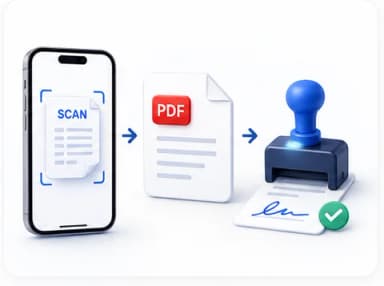
This is one of the most common real-world document tasks: someone hands you a printed form, or you need to sign something that only exists on paper, and you need a clean, signed, shareable PDF at the end — with no scanner in sight. Done piece by piece, it's four small steps. Done as a connected workflow, it's a couple of minutes.
The full workflow, step by step
Each step hands its result directly to the next — no re-uploading, no re-downloading in between.
Take a photo
Straight-on, even lighting, no flash — see our phone scanning guide for the details that matter most.
Download & share
A clean, signed, searchable PDF — ready to send.
Why this specific order matters
It's tempting to skip straight from photo to signing, but doing the cleanup and OCR steps first genuinely changes the quality of the final result. A cleaned-up image gives OCR a much better chance at accurate text recognition — shadows and skew are two of the most common causes of OCR mistakes. And running OCR before signing means the final document is fully searchable and text-selectable, not just a signed picture that happens to look like a document.
When you can shortcut this workflow
Not every document needs every step. If your photo is already well-lit and straight, the cleanup step might only take a few seconds of confirmation rather than real correction. If you only need to sign something and searchability genuinely doesn't matter (a one-off form you're sending once and never referencing again), skipping OCR entirely saves a step with no real downside. The workflow is a sequence of options, not a rigid checklist you must fully complete every time.
What this replaces
Before phone-based workflows like this existed, the equivalent process meant physically scanning a document on a flatbed scanner, emailing it to yourself, opening it on a desktop, using separate desktop software to run OCR, printing it again to physically sign it, then re-scanning the signed version — often across two or three different pieces of software with no connection between them. Compressing that into four connected steps on the same device you took the photo with is the actual point of a workflow like this, not any single step in isolation.
Common Mistakes
Signing before cleaning up a poor-quality photo
A shadow or skew that would have been quick to fix earlier is much harder to correct once a signature is already placed on the document — clean up first, sign last.
Running OCR on a badly lit or blurry photo
OCR accuracy drops significantly on poor-quality images. A short cleanup pass first meaningfully improves how accurately the text gets recognized.
Re-photographing instead of using cleanup tools for a fixable issue
Minor skew and lighting unevenness are exactly what cleanup tools are built to fix — a full re-shoot is only necessary for more serious issues like severe blur or missing parts of the page.
Start This Workflow — Sign a Document
Sign PDF, Word documents, and photos of printed pages securely online — upload or draw your signature, place it anywhere, and download. Free, no login required.
Frequently Asked Questions
Related Articles
Image Guides
How to Scan a Document With Your Phone Like a Pro
You do not need a scanner. You need good light, a straight angle, and the right cleanup afterward — here is exactly how to get a properly scanned-looking result from just a phone camera.
AI Guides
What Is OCR and When Do You Actually Need It
OCR turns a picture of text into real, searchable, copyable text. Here is what it actually does, how accurate modern AI-powered OCR really is, and the situations where you genuinely need it.
Workflow Guides
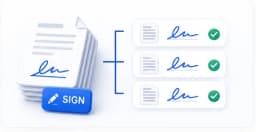
How to Batch-Sign Multiple Documents Efficiently
Signing 12 contracts one at a time, re-uploading your signature every single time, is real, avoidable friction. Here is how a proper batch-signing session works.