QR Codes for Business: Practical Uses Beyond Menus
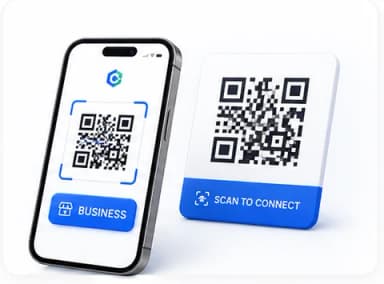
QR codes had a moment as the default answer to "how do we make this contactless" during the pandemic and, fairly or not, picked up a reputation as a slightly tired restaurant-menu gimmick as a result. That reputation undersells what the underlying technology is actually good at: instantly bridging a physical object or printed document to a digital destination, with zero typing required from the person scanning it.
What a QR code actually does, technically
A QR code is just a visual encoding of data — most commonly a URL, but it can also encode plain text, contact details, WiFi credentials, or a payment reference. A phone camera decodes the pattern back into that original data instantly. The entire value proposition is removing the friction of manually typing a URL or searching for information — someone scans, and they're immediately at the right destination.
Genuinely useful business applications
- On printed invoices or receipts, linking directly to a digital copy, a payment page, or a support contact — useful when the physical document alone can't hold everything a customer might need.
- On product packaging, linking to setup instructions, a warranty registration page, or a manual — avoiding a bulky printed insert while still making the information one scan away.
- On business cards or printed marketing material, linking directly to a contact-save action or a specific landing page — meaningfully lower friction than asking someone to type a URL from memory later.
- On physical asset labels (equipment, inventory), linking to a maintenance log or specification sheet — useful for field teams who need information on the spot without searching a database manually.
- On signed contracts or official documents, linking to a verification page or the digital original — a way to bridge a physical, signed copy back to its authoritative digital record.
Making QR codes that actually work well in practice
- Test the scan yourself, on an actual phone, before publishing anything — printed size, contrast, and even the paper's glossiness can all affect scannability in ways that aren't obvious looking at a screen.
- Link to a mobile-friendly destination — someone scanning a QR code is on their phone by definition, so the page they land on should work well on a small screen.
- Keep the encoded content as simple as reasonably possible — shorter URLs and simpler data produce a less visually dense code, which scans more reliably, especially at smaller printed sizes.
- Include a brief label near the code explaining what scanning it will do — "Scan to view warranty info" removes any hesitation about whether it's worth scanning at all.
When a QR code is the wrong tool
If the information genuinely needs to be visible at a glance without a phone in hand — an emergency contact number, a critical safety warning — a QR code alone isn't appropriate, since it requires an extra step (having a phone, a working camera, and a moment to scan) that not everyone can complete in every situation. QR codes work best as a supplement to easily accessible information, not a replacement for it when immediacy matters.
Common Mistakes
Publishing a QR code without personally test-scanning it first
Print size, contrast, and paper texture can all affect real-world scannability in ways that don't show up when just looking at the code on a screen. Always test-scan the actual printed version before distributing it widely.
Linking a QR code to a page that is not mobile-friendly
Everyone scanning a QR code is on their phone by definition. Landing them on a page not designed for a small screen undermines the whole convenience the QR code was supposed to provide.
Using a QR code for information that needs to be instantly visible without a phone
Anything time-critical or safety-related should remain directly readable — a QR code adds a required extra step that not everyone can complete in every situation.
Create a QR Code Now
Create fully customizable QR codes — gradients, logos, custom shapes, and instant scan validation.
Frequently Asked Questions
Related Articles
Productivity Guides
How to Build a Strong Password You'll Actually Remember
Complexity rules like one-capital-one-number-one-symbol are outdated advice. Here is what actually makes a password hard to crack, and how to make it memorable too.
Business Documents
How to Create a Professional Invoice That Gets You Paid Faster
Late payments are often a paperwork problem, not a customer problem. Here is exactly what a clear, professional invoice needs to reduce delays and disputes.
Productivity Guides
How to Organize and Name Your Documents Like a Pro
Most document chaos comes from inconsistent naming and folder structure, not too many files. A few simple conventions fix almost all of it.